Monday, November 12, 2012

See more relevant reviews and share feedback with your friends on Google Shopping

Reading product reviews has become an important part of how people research products and decide what to buy; in fact, last holiday season, 67% of shoppers read product reviews before making a purchase. This means that it’s more important than ever to give users the ability to quickly find the reviews they trust the most -- those from friends and family.

So today, we’re announcing two new Google Shopping features that help savvy shoppers better find the reviews that will best help them make shopping decisions. The first feature lets you see if a product you’re looking for has been reviewed by someone you know. The second enables you to write product reviews on Google Shopping, to help friends and other Google users make smart purchases.

Read reviews from people you know
Now you can easily see if someone you've connected with on Google has reviewed a product that is in your Google Shopping search results. 
See reviews from people you know in your Google Shopping search results
When you click on a particular product and scroll down to the ‘Reviews’ section, reviews from your friends and contacts will appear at the top of the list.
Reviews from friends and contacts appear at the top of the "Reviews" section

Share your own reviews
We’ve also made it easy to write your own product reviews on Google Shopping. To write a review, login with your Google+ account, click on the product you’d like to review, then click the ‘write a review’ button at the top of the page. 

Click 'Write a review' when viewing a product on Google Shopping
Rate the product, write your feedback, and click 'Publish'
Once you submit your review, it will be publicly available to anyone who views that product on Google Shopping.   You can also choose to post your review to your Google+ stream.
You can choose to share your review in your Google+ stream
And, of course, when people who are connected to you search for or click on that product, your review will be highlighted.

Happy Shopping!

Posted by Karen Corby, Product Manager, Google Shopping


Friday, November 9, 2012

Google Shopper 3.0 - New features to help with your holiday shopping

As you hit the mall this holiday season, chances are you’ll be accompanied by a reliable personal shopping companion: your mobile phone. Four out of five mobile phone and tablet owners plan to use their device for holiday shopping - for comparing prices, locating nearby stores, and searching for coupons. Today, with the launch of Google Shopper 3.0 for Android, you can easily browse for gift ideas, research products, and locate great deals on the go.

Search for products and get gift ideas on the redesigned home page
The app’s redesigned home screen features a bigger search box for easier navigation. When you browse curated gift ideas and latest trends on the home page or search for apparel and accessories, larger photos let you view product designs in more detail.


Find great sales and special offers with Google Shopper
Shopper now makes it quick and easy to find great deals at local and online stores. From the new Sales page, you can view weekly circulars from nearby stores, along with a handful of featured current promotions which you can redeem online or in person. Shopper also shows you store promotions, such as ‘30% off’ or ‘free shipping’, as you search for products in the app.

      
Find great deals on the new Sales screen and as you search for products    

Use GoodGuide rating to Identify healthy, safe, and eco-friendly products
Whether you shop with a conscience or would like a reason to start, Shopper now features GoodGuide ratings, a rating system that indicates on a scale of one to ten whether a product is healthy, safe and environmentally friendly. When GoodGuide ratings are available for a product, you can view these by scrolling down the product detail screen, as shown below. You can learn more about the GoodGuide rating system here.

GoodGuide product ratings


You can download Shopper 3.0 for your Android device from Google Play.

Posted by John Shriver-Blake, Product Manager, Google Shopper


Thursday, November 1, 2012

Save time when purchasing things on your phone with Google Wallet

Making purchases on your mobile phone can be a lot easier. Starting today, on sites that accept Google Wallet, you don’t need to enter your credit or debit card number, billing address or other payment information — it’s already securely stored in your Google Wallet.


Typically, on mobile websites, you need to key in 17-20 fields of information on a small screen while having to click and scroll through multiple pages to provide shipping and billing information. It’s no wonder up to 97% of mobile shoppers abandon their mobile shopping carts. Google Wallet makes it easy and secure for you. Simply click the Buy with Google Wallet button, log into Google Wallet and click to complete your order. That’s it — you’re done in 3 steps.

With Google Wallet, you can buy flowers and gifts at 1-800-Flowers.com quickly and easily on your mobile phone. You can also use Google Wallet to buy on Rockport.com and FiveGuys.com (at select locations).

With Google Wallet you can:

  • Pay without entering your credit or debit card number, billing address, or other payment information — it’s already securely stored in your Google Wallet.
  • View your credit and debit cards, shipping addresses and transaction history conveniently in one place at wallet.google.com/manage.
  • Set a default card for future purchases on your Google Wallet account, making future transactions even faster.
  • Shop with confidence as all your payment and related information is encrypted and stored on secure servers and not shared with anyone.

Limited time — Save money at 1-800-Flowers.com and Rockport.com

Not only does Google Wallet save you time, it can also save you money. For a limited time, buy with Google Wallet on your mobile device and get $10 off at 1-800-Flowers.com and $20 off at Rockport.com (some restrictions apply).

We are working with a number of other exciting retailers to integrate Google Wallet on their mobile sites, including Finish Line, MovieTickets.com, Seamless, SwimOutlet.com and more, so stay tuned for more announcements.

Posted by Barak Turovsky, Head of Mobile Commerce, Google Wallet

Thursday, October 18, 2012

Showcase your promotions and get your customers’ attention

Shoppers are savvier than ever. They use social recommendations, web searches and smartphone apps to make informed purchase decisions. So how can a retailer stand out and get a shopper’s attention?

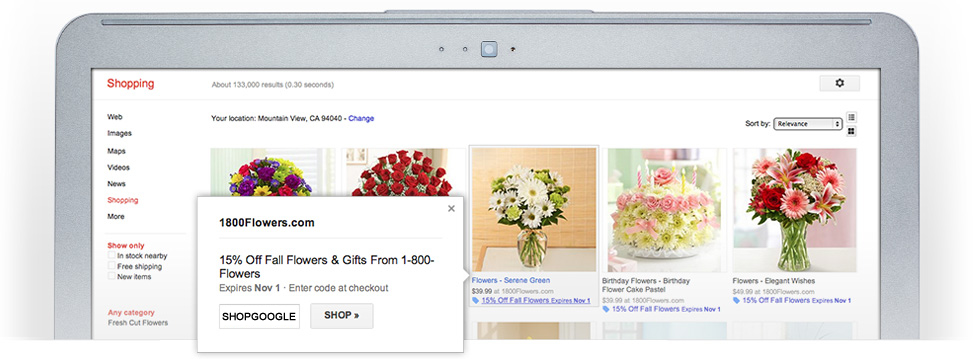
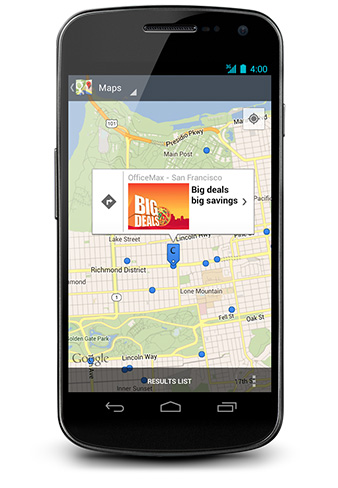
Today, we're rolling out a new way for retailers to reach shoppers at the moment of interest. Retailers can now add promotions to their product listings on Google Shopping to make them stand out. In addition, they can distribute their promotions on other Google properties such as Google Maps for Android and the Google Offers app, and attract shoppers to their store.


Promotions are highlighted in product listings on Google Shopping

In a few simple steps retailers can create a promotions list, map it to the right products in Google Shopping and upload to Google Merchant Center.  Our system supports user specific redemption codes and associated reporting, enabling retailers to measure the performance of each promotion.
 
Shoppers can see nearby promotions while searching in Google Maps for Android

This is one of the many steps we’re taking to provide traffic, technology and tools to help retailers grow their business. Over 25 well-known U.S. retailers, including 1-800-flowers.com, OfficeMax®, Inc., Tommy Hilfiger, Express, Chico’s, Overstock, Guitar Center, Drugstore.com and Wayfair, are already part of this program. In the coming months, we plan to expand the program to include more retailers. If you are interested in featuring your promotions on Google properties, you can learn more here.


Posted by Nitin Mangtani, Group Product Manager, Google Offers and Michaela Feller, Product Manager, Google Shopping

Tuesday, October 2, 2012

Google Shopping: transition update and new functionality in time for the holidays

Over the last 4 months, Google Shopping has been moving to a commercial model built on Product Listing Ads. One of the reasons we decided to make this transition was to get better data from merchants in order to build a better shopping experience for users. We are very pleased with the participation from retailers in our new model and many are starting to report success.

Starting on October 17, Google Shopping results in the US will come only from merchants who are Product Listing Ads advertisers. We will be ranking these results based on relevance, with bidding as an additional factor. The ranking of natural search results on Google.com will not change.

Help for the Holidays 


For merchants who have not yet made the transition, it’s not too late to get your products on Google Shopping and optimized in time for the holiday season. You can do so by signing up for Product Listing Ads; please visit www.google.com/ads/shopping for more information. For merchants attending SMX East in New York City this week, we would love to hear from you during the Google Shopping Q&A session on October 4 at 2:30 PM local time. We look forward to making ourselves available to answer any questions you may have regarding Product Listing Ads on Google Shopping.

For help optimizing your Product Listing Ads, check out our Google Shopping best practices guide or watch 
our optimization video. Additionally, we’ll be hosting a ‘Bidding Strategies for the Holidays’ Hangout on Air on October 19 at 10:00am PST. Visit the Ads Google+ page to join the Hangout.

A New Way to Optimize Campaigns

We’ve gotten a lot of requests for tools that make it easier to manage campaigns at a more granular level, so we’re pleased to announce the availability of 
product level bidding. This addition to the Product Listing Ads toolkit will help merchants during the holiday season and beyond in a number of ways.
  • Optimize bids for individual products. You can now improve your Product Listing Ad performance by setting your cost per click bid at the item level. This functionality should help you meet your volume and profit targets at the product level.
  • Easily create product targets. It is now possible to create product targets using the product ID in your Merchant Center feed to manage your bids at the product level.

We believe this feature will create new opportunities for optimization by allowing you to easily target individual products, and will help you make the most out of your Google Shopping campaigns.

For more information on product targets please visit the AdWords Help Center.

We look forward to releasing more tools and features i
n the coming months to help you reach new customers on Google Shopping. Stay tuned!

Posted by Sameer Samat, Vice President of Product Management, Google Shopping

Monday, October 1, 2012

Browse your favorite catalogs on the web

Last year we introduced Google Catalogs, giving shoppers a rich, new way to browse and explore their favorite catalogs on a tablet device. Since then, Google Catalogs has grown to become one of the largest collections of digital catalogs, featuring thousands of issues from over 300 retail brands, including catalog favorites like Williams Sonoma, J.Crew, Eddie Bauer, and more.

Today we’re excited to announce that shoppers can now browse our entire catalog inventory on the web through Google Shopping, making it easier than ever to stay up to date on the latest styles, shop for products, or maybe even get a head start on holiday wishlists.


To start shopping, visit www.google.com/shopping/catalogs. From here, you can browse our editor’s weekly picks and see what’s new in the ‘Latest catalogs’ section. Click ‘Brands’ to view an alphabetical list of catalogs, or select ‘Categories’ to browse over 25 catalog categories, including Women’s Fashion & Apparel, Home, Kids & Baby, Outdoor Adventure, Toys, and many more.


Once you find a catalog you like, click on the issue to open the catalog viewer where you can flip through catalog pages and zoom in to see products up close. To view information about specific products, roll your mouse over the page and click the tag for the product you’re interested in. This opens a box with more information, additional views, and price. Clicking ‘View Details’ takes you directly to the retailer’s site to learn more or make a purchase.


You can also browse a selection of the latest catalogs in the ‘Featured Catalogs’ section on the Google Shopping home page. Over time, we plan to incorporate catalogs more deeply throughout the Google Shopping experience, giving you more ways to find ideas and inspiration as you shop and engage with your favorite brands.


'Featured Catalogs' on the Google Shopping home page
If you’re a retailer interested in submitting your catalog for inclusion in both the tablet app and web experience, we’d love to hear from you. 

Posted by Abigail Holtz, Business Product Manager, Google Shopping